
1. The Great Checkout Dilemma
You are standing at a digital crossroads. Your cart total is exactly $100. In one tab, you have a 10% promo code that works instantly. In another browser extension, you have a 12% cashback offer that will hit your account in 90 days.
Most shoppers see the “12%” and assume it’s the winner. They are wrong.
At MamaSV, we don’t look at the flashy percentages that retailers use to bait clicks. we look at the Net Out-of-Pocket (NOP) cost. This is the only number that matters. To understand why the 10% code often beats the 12% cashback, we have to look at the “hidden math” of sales tax and the “time value” of your own money.
In this guide, we are stripping away the marketing fluff. We are going to look at the $LaTeX$ behind the savings, the technical “cookies” that track your rewards, and the “Order of Operations” you need to follow if you want to beat the retailer’s pricing algorithm.
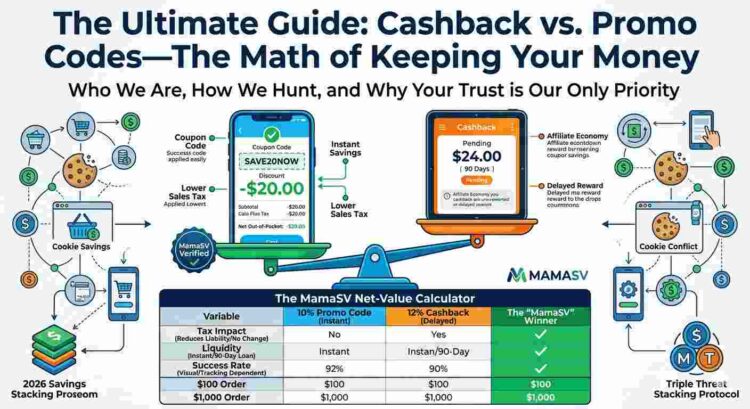
2. The MamaSV “Net-Value” Comparison Table
Use this to determine if you should take the instant win or wait for the 90-day rebate.
| Variable | 10% Promo Code (Instant) | 12% Cashback (Delayed) | The “MamaSV” Winner |
| Applied To | Gross Price (Total Cart) | Net Subtotal (Minus Tax) | Promo Code (Includes Tax/Ship) |
| Sales Tax Impact | Reduces Tax Liability | No Change in Tax | Promo Code (Saves 8-10% more) |
| Liquidity | Immediate Cash-in-Pocket | 90-Day “Interest-Free Loan” | Promo Code (Zero wait time) |
| Success Rate | Visual Confirmation | Tracking & Cookie Dependent | Promo Code (Guaranteed) |
| $100 Order | $11.00 Total Savings | $10.80 Total Reward | Promo Code |
| $1,000 Order | $110.00 Total Savings | $120.00 Total Reward | Cashback (On high-ticket items) |
3. The “Net Out-of-Pocket” Philosophy
Before we dive into the comparison, we need to define the MamaSV Golden Metric.
Most “coupon sites” talk about “Total Savings.” We think that is a misleading term. “Savings” is a theoretical number. Out-of-Pocket Cost is a physical reality.
-
Promo Codes are “Pre-Transaction” events. They reduce the price before you swipe your card.
-
Cashback is a “Post-Purchase” event. You pay the full price now, and the retailer (via an affiliate) pays you back later.
The difference isn’t just about timing; it’s about Liquidity. If you use a promo code, that money never leaves your bank account. If you use cashback, you are essentially giving the retailer an interest-free loan for 90 days while you wait for your “rebate” to clear. In 2026, with the cost of living where it is, keeping cash in your pocket today is almost always more valuable than a slightly higher “credit” tomorrow.
4. Decoding the Promo Code: The “Top-Down” Discount
The promo code is the oldest tool in the e-commerce kit, but its technical execution has changed. In the early days, a code was a simple subtraction. Today, it is a Logical Trigger in a retailer’s database.
The “Invisible” Tax Benefit
This is the secret that most shoppers miss. When you use a promo code, you aren’t just saving the face value of the code; you are saving on Sales Tax.
Let’s look at the math:
If you buy a $100 item in a state with 10% sales tax:
-
Without a code: You pay $100 + $10 tax = $110.00
-
With a 10% code: The price drops to $90. Your tax is now calculated on $90, which is $9. Total = $99.00
In this scenario, your “$10 coupon” actually saved you $11.00.
The “Exclusion” Trap
Retailers aren’t stupid. They know that “20% Off Everything” is a powerful hook. However, tucked away in the “Terms and Conditions” (the stuff we read so you don’t have to) are the Category Exclusions.
Modern promo codes are programmed to ignore “MAP” (Minimum Advertised Price) items. This is why your code works on the generic store-brand t-shirt but “fails” on the Sony headphones or the Nike shoes. At MamaSV, we categorize these as “Dirty Codes”—strings that exist just to get you to the site, only to let you down at the finish line.
The “Minimum Spend” Psychological War
We have all been there: You have a “$10 off $50” code, but your cart is at $42. The retailer’s goal is to make you spend an extra $15 on something you don’t need just to “save” that $10.
The MamaSV Rule: If you have to spend more money to use a coupon, you aren’t “saving”—you are being “upsold.” A promo code is only a win if it applies to the items you were already going to buy.
5. The Technical Anatomy: Why Codes “Die”
Ever wonder why a code works for your friend but not for you? It isn’t random. Retailers now use Device-Fingerprinting.
When you enter a code, the retailer’s server checks:
-
Your IP Address: Are you using a VPN? (Many retailers block codes for VPN users to prevent regional arbitrage).
-
Account Age: Is this a “Legacy Account” or a “New User”?
-
Cookie History: Have you seen this code on a different site?
This is why we emphasize the Manual Verification process. A code isn’t just a string of letters; it’s a permission slip from the retailer. If the permission slip is “User-Specific,” it doesn’t belong on a public list.
6. Decoding Cashback: The Economy of Referral Fees
While a promo code lives on the retailer’s own server, Cashback lives in the world of third-party attribution. When you use a platform like Rakuten, Honey, or TopCashback, you are participating in a B2B Referral Loop.
Here is the “behind the curtain” reality: The retailer pays the cashback site a commission for sending you to their store. The cashback site then splits that commission with you. If you see “10% Cashback,” it usually means the retailer is paying the site 12% or 15%, and they are passing the majority of that “kickback” to you to keep you loyal to their platform.
The “Net Subtotal” Calculation
Unlike a promo code, which impacts the gross price, cashback is almost always calculated on the Net Subtotal.
-
It does NOT include Sales Tax.
-
It does NOT include Shipping Costs.
-
It does NOT include the value of any gift cards used.
This is a critical distinction. If you spend $100 but $15 of that is tax and shipping, your “10% Cashback” is only $8.50, not $10.00. This is the first “leak” in the cashback bucket.
7. The 90-Day Waiting Period: Why Your Money is “Pending”
The most common question we get at MamaSV is: “Why can’t I have my money now?” The answer lies in the Return Window. Retailers refuse to finalize their commission payments to cashback sites until the legal window for you to return the product has closed. If they paid you immediately, “serial returners” could game the system—buying an item, taking the cashback, and then returning the item for a full refund.
The Opportunity Cost of Waiting
In a 2026 economy, Liquidity is King. When your money is “Pending” for three months, you are effectively giving the retailer an interest-free loan.
-
If you save $20 today with a code, you can put that $20 into a high-yield savings account or use it to pay off a bill immediately.
-
If you wait 90 days for $20 in cashback, the “Real Value” of that money has actually decreased due to inflation.
At MamaSV, we believe a $10 bird in the hand (Promo Code) is often worth more than a $12 bird in the bush (Cashback).
8. The Head-to-Head Math: A $200 Purchase Case Study
Let’s look at a real-world scenario to see how the numbers actually shake out. Suppose you are buying a $200 coffee machine. The sales tax is 8%.
Option A: The 10% Promo Code
-
Original Price: $200.00
-
10% Discount: -$20.00
-
New Subtotal: $180.00
-
Sales Tax (8% of $180): $14.40
-
Total Paid at Checkout: $194.40
-
Instant Savings: $21.60 (Discount + Tax Savings)
Option B: The 12% Cashback Offer
-
Original Price: $200.00
-
10% Discount: $0.00
-
Sales Tax (8% of $200): $16.00
-
Total Paid at Checkout: $216.00
-
Cashback Earned (12% of $200 Subtotal): $24.00 (Pending for 90 days)
-
Net Final Cost: $192.00
The Verdict: On paper, Option B is $2.40 “cheaper.” However, you had to pay $21.60 more upfront at the register. If that coffee machine puts you over your monthly budget, the $2.40 “win” isn’t worth the immediate financial strain.
9. When Cashback Fails: The “Ghost” Tracking Problem
The biggest risk with cashback is that it is Non-Guaranteed. Unlike a promo code, which you see working before you pay, cashback is a promise that can be broken by a single browser cookie.
The “Last-Click” Attribution Model
Most cashback sites operate on “Last-Click” logic. If you click a cashback link, but then quickly jump to another tab to “double-check” a coupon site or a blog, that second click might drop a new cookie that “steals” the attribution. The cashback site won’t get their commission, and they won’t pay you.
Technical Enemies of Cashback:
-
Ad-Blockers: These often block the “Tracking Pixel” that tells the retailer you came from a cashback site.
-
VPNs: Some retailers view VPN traffic as “High-Risk” and automatically disqualify it from affiliate rewards.
-
Private Browsing/Incognito: These modes clear cookies, making it impossible for the tracking to “stick.”
At MamaSV, we suggest a “Clean Room” approach: If you are chasing a big cashback reward, use a dedicated browser with no extensions, clear your cookies, click the link, and complete the purchase in one sitting without opening other tabs.
10. The Stacking Masterclass: The “Triple Threat” Strategy
To a casual shopper, $10\%$ is just $10\%$. To a MamaSV strategist, a discount is just the first layer of a multi-stage payload. The goal is to “Double-Dip” or even “Triple-Dip.”
The Triple Threat Layering:
-
Layer 1: The Promo Code (Reduces the checkout price + Tax).
-
Layer 2: The Cashback Portal (Rebate on the remaining subtotal).
-
Layer 3: The Credit Card Reward (Points/Cash based on the final Swipe).
The Technical Order of Operations
If you perform these steps in the wrong order, the tracking “breaks.” In 2026, retailers have hardened their systems against “Aggressive Stacking.” Follow this specific sequence:
-
Step 1: Incognito/Clean Session. Clear your browser cache or use a fresh window. This ensures no “stale” cookies from other sites steal your attribution.
-
Step 2: Activate the Portal FIRST. Go to your cashback site (or app) and click the “Shop Now” link. This drops the Primary Attribution Cookie.
-
Step 3: Build the Cart. Do not add items to your cart before clicking the link. Some retailers only reward “New Sessions.”
-
Step 4: Apply the Manual Code. At the very last stage of checkout, enter your MamaSV-verified code.
-
Step 5: Finalize with the Right Card. Use a card that maximizes that specific store’s Merchant Category Code (MCC).
11. The 2026 Cookie War: Honey vs. Rakuten and “Attribution Theft”
A major shift occurred in early 2026: major affiliate networks (like Rakuten) began dropping support for “Auto-Applying” browser extensions (like Honey). Why? Because of Attribution Theft.
When you have multiple extensions installed, they fight for the “Last Click.” If you clicked a Rakuten link to get 10% back, but then a different extension “popped up” at checkout to try five codes for you, that second extension might overwrite the first cookie.
-
The Result: You might save $2 with a code, but you LOSE $20 in cashback because the tracking was hijacked at the last millisecond.
The MamaSV Advice: Disable all “auto-coupon” extensions when chasing a high-value cashback reward. Use manual codes from a trusted source (like us) so you don’t trigger a “Cookie Overwrite.”
12. The “Triple Threat” Math: Seeing the Stack in Action
Let’s take that $200 coffee machine again.
-
Retailer Price: $200.00
-
MamaSV Code (10%): -$20.00 (New Subtotal: $180)
-
Cashback Portal (10% on $180): -$18.00 (Pending reward)
-
Credit Card Reward (3% on $194.40 total): -$5.83 (Statement credit)
The Final Net Cost: $170.57
Total “Real” Savings: $29.43 (Approx. 15%)
By stacking, you didn’t just choose between 10% and 3%; you blended them into a compound discount that the retailer never intended to give you.
13. Understanding the “MCC” (Merchant Category Code)
To win at the “Triple Threat” level, you have to understand how your bank “sees” the transaction. Every retailer is assigned a 4-digit Merchant Category Code (MCC).
-
Example: A purchase at Amazon might be coded as “5310” (Discount Store), while a purchase at a local boutique might be “5651” (Family Clothing).
If your credit card offers “3% on Online Shopping,” but the retailer uses a “Grocery” MCC, you will only get 1% back. Before making a big purchase, check the MCC. If a store is “Uncategorized” by your bank, the promo code becomes significantly more valuable because the “Layer 3” reward is guaranteed to be low.
14. The MamaSV Verdict: When to Use Which?
| Feature | Winner: Promo Code | Winner: Cashback |
| Speed | Instant | 90+ Days |
| Reliability | High (Visual Confirmation) | Moderate (Tracking dependent) |
| Tax Impact | Reduces Sales Tax | No Impact on Tax |
| Effort | Low (Copy/Paste) | High (Tracking/Log-in) |
| Value on Small Orders | WINNER | Loser |
| Value on Big Orders ($500+) | Loser | WINNER |
15. Final FAQ: Navigating the Complexities of Modern Savings
Does using a promo code reduce the actual amount of cashback I earn?
Yes, almost always. Because cashback is calculated on the Net Subtotal (the final price you pay the retailer after all other discounts), applying a $20 promo code shrinks the base number the cashback percentage is applied to.
For example, on a $100 order with a 10% cashback offer:
-
No Code: You earn $10.00 cashback.
-
With a $20 Code: Your subtotal is $80. You now earn 10% of $80, which is $8.00. At MamaSV, we calculate the “Inverse Loss.” In this case, you saved $20 instantly but lost $2 in future cashback. The $18 “Net Win” is still the superior choice because of the Liquidity Factor.
Can I use cashback on top of a “Military,” “Student,” or “Healthcare” discount?
This is a common “Grey Area” in 2026 e-commerce. Most affiliate networks have “Non-Commissionable” clauses for unique, ID-verified codes. If the retailer’s system detects a one-time-use code generated via SheerID or ID.me, they often refuse to pay the referral fee to your cashback portal.
Our internal testing shows that “Public” promo codes (like the ones we verify at 6 AM) are much more likely to “stack” with cashback than these private, ID-linked codes. If you have to choose, the Instant ID Discount is a guaranteed win, whereas the cashback is a gamble that may be declined 30 days later.
What happens to my rewards if I return part of a “Stacked” order?
Partial returns are the “silent killer” of savings. Retailers use Threshold Logic for their promos. If you use a “Spend $100, Get $20 Off” code and your original cart was $105, returning a $10 item drops your “Qualified Spend” to $95.
In this scenario, the retailer will often subtract the entire $20 discount from your refund. Furthermore, the cashback portal will see the “Return Flag” on the transaction and may void your entire rebate, even for the items you kept. At MamaSV, we advise: if you plan to return an item, do not use a threshold-based promo code.
Why did my cashback “Disappear” after I used a browser extension to find a code?
You likely fell victim to Attribution Hijacking. In the world of 2026 affiliate marketing, the “Last Click” wins the commission. When a browser extension “pops up” at the checkout screen to “Auto-Apply” codes, it drops a new tracking cookie.
Even if that extension doesn’t find a better code than the one you already have, the act of it “checking” often overwrites your original cashback cookie. This is why we are so vocal about Manual Code Entry. By typing the code yourself and keeping other extensions disabled, you protect your “Attribution Path” and ensure your money stays yours.
Is it safe to link my bank account to “Instant Cashback” apps in 2026?
Technically, most reputable apps use Open Banking APIs (like Plaid or Yodlee) which use bank-level encryption and do not share your login credentials with the app itself. However, the “Cost” is your Consumer Privacy.
By linking your account, you are giving that company a 360-degree view of your spending habits across all retailers, not just the ones you use their app for. If you are uncomfortable with “Big Data” profiling, Manual Promo Codes are the superior choice. They offer a “Zero-Footprint” way to save money without turning your bank statement into a product for advertisers.
What is the “Minimum Payout Threshold” and how does it affect my savings?
This is the “Hidden Lock” on cashback. Many sites require you to reach a balance of $10, $20, or even $50 before they will send you a check or a PayPal transfer. If you only shop once or twice a year, your “savings” could sit in their bank account for years, effectively becoming useless.
The MamaSV Rule: If your expected cashback is less than the payout threshold, always prioritize a Promo Code. An instant $5 off is infinitely better than $7 “pending” in an account you can’t withdraw from.
16. Final Thought: Your Data is the Currency
Always remember: If a cashback offer looks too good to be true (e.g., “25% back at a major electronics store”), you are likely paying with your Data. These platforms track your SKU-level purchase history and sell that “Consumer Intent” data to marketing firms. If privacy is your priority, stick to Manual Promo Codes. They offer the “cleanest” way to save without turning your shopping habits into a product for a third party.

No Comments
Leave Comment