
1. Introduction: Beyond the “Invalid Code” Error
We have all been there. You spend forty minutes meticulously curating the perfect cart—perhaps a high-end Roborock vacuum for the home or a specific wellness regimen from Oxford Online Pharmacy. You find a promising promo code, type it into the box with a sense of impending victory, and click “Apply.”
Then, the red text appears: “Coupon code is not valid.” or “Requirements not met.”
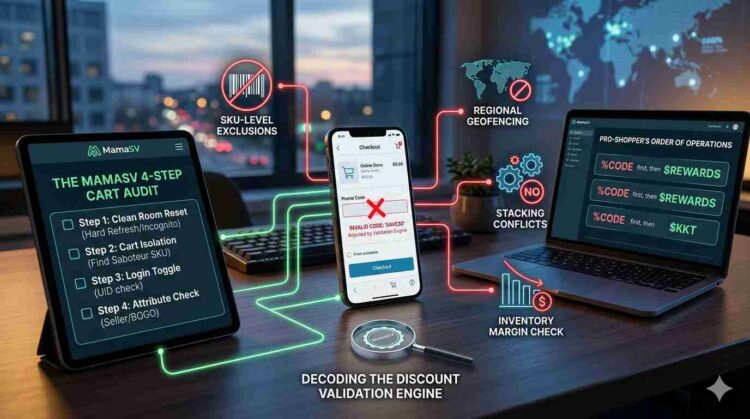
For most shoppers, this is where the journey ends in frustration. You either pay the full price with a sense of resentment, or you abandon the cart entirely. But at MamaSV, we view this red text not as a dead end, but as a data point. Behind that simple error message lies a complex network of algorithms, legal contracts, and database checks known as the Discount Validation Engine.
In this guide, we are moving beyond the “guesswork” of online shopping. We are going to teach you how to perform a Technical Audit of your own checkout. By understanding the “code behind the code,” you can stop being a victim of “Coupon Roulette” and start engineering your own successful checkouts.
2. The “Six Pillars of Failure”: Technical Reasons for Code Rejection
To solve a problem, you must first understand the physics of the system. A promo code isn’t just a word; it’s a Conditional Logic Trigger. When you hit apply, the retailer’s server runs a “Validation Script” that checks your cart against hundreds of rules in milliseconds.
Here are the 6 technical pillars where those scripts often find a “False” value.
Pillar 1: Attribute-Based Exclusions (The SKU-Level Guardrail)
The most common reason a code fails isn’t that the code is “dead”—it’s that your cart contains a “Saboteur SKU.” Retailers use SKU-level tagging to protect their profit margins. Many high-end brands (like Apple, Dyson, or certain luxury designers) enforce what is known as a Minimum Advertised Price (MAP) policy. This is a legal contract between the brand and the retailer that forbids the retailer from selling the item below a certain price.
-
The Technical Logic: Even if a site offers a “20% Off Site-Wide” code, the Discount Validation Engine is programmed to scan every item’s “Exclusion Flag.” If a MAP-protected item is in your cart, the code is automatically neutralized for that specific item.
-
The “Ghost” Error: Sometimes, a single excluded item will “break” the code for the entire cart, even if the other items are eligible. This is a flaw in the merchant’s API logic, and it’s one of the primary reasons verified codes appear “broken.”
Pillar 2: The Subtotal Threshold & “Net-Value” Math
Many codes require a minimum spend (e.g., “Save $20 on orders over $100”). However, shoppers often miscalculate what the retailer considers the “Net Eligible Subtotal.”
Retailers don’t calculate the threshold based on the number at the bottom of the screen. They calculate it based on a specific mathematical formula:
The “Tax Trap”: One of the biggest reasons for failure is including taxes and shipping in your mental math. Most validation engines check the subtotal before these costs are added. If your cart is $100.05 including tax, but only $94.50 in actual product, a “$100 Minimum” code will fail every time.
Pillar 3: Regional Geofencing & Currency Mismatches
In a global economy, promo codes are often Geofenced—meaning they are mathematically locked to a specific IP range or shipping destination.
-
The Currency Latency: If you find a code on a UK-based affiliate site but you are shopping on the US version of the store (
.comvs.co.uk), the code will likely fail. This isn’t just a location issue; it’s a Currency Conversion Logic issue. -
The API Conflict: Retailers often run different databases for different regions. A code generated for the “EMEA” (Europe, Middle East, Africa) region simply does not exist in the “NA” (North America) database. When you enter it, the server returns a “Code Not Found” error because it is literally looking in the wrong “Digital Filing Cabinet.”
Pillar 4: User-Account “Entitlement” Logic (The CRM Gatekeeper)
In 2026, a promo code is rarely just a universal string. It is often a User-Specific Entitlement. When you enter a code, the retailer’s server doesn’t just check if the code exists; it checks if you are allowed to use it.
-
The “New User” Flag: Retailers use your Customer Relationship Management (CRM) profile to track your entire purchase history. If you are logged in, the system checks your User ID (UID). If you have a single purchase from three years ago, the “Welcome10” code will return a “Requirement Not Met” error.
-
The Shadow Profile: Even if you aren’t logged in, retailers use First-Party Cookies and your email address (if entered during the guest checkout phase) to “de-duplicate” your identity. If that email is already in their database, the validation engine will flip a Boolean switch to “False,” killing the discount instantly.
Pillar 5: Temporal & Time-Zone Deactivation (The “Midnight Glitch”)
Promo codes are governed by a technical attribute called TTL (Time to Live). However, the disconnect between a retailer’s “Server Time” and a shopper’s “Local Time” creates what we call the Midnight Glitch.
-
The UTC vs. EST Conflict: Many global retailers set their codes to expire at 11:59 PM based on Coordinated Universal Time (UTC) or the time zone of their corporate headquarters (often EST for US brands). If you are shopping in California at 9:30 PM, the code might already be “dead” because the server has already rolled over to the next day.
-
Staged Rollouts: Some codes, especially for high-demand launches like Nubia smartphones or limited Mpix photo runs, are released in “Stages.” The code might be “Active” in the database but not yet “Enabled” for the public API. This is why a code you see on social media might fail for the first hour of a sale—the “Staging Environment” hasn’t pushed the update to the “Live Environment” yet.
Pillar 6: The “Stacking Conflict” Protocol (Boolean Logic at Work)
This is the most frustrating pillar for the “Pro-Shopper.” You have a 15% off code and a “Free Shipping” code, but the site only lets you use one. This is governed by Mutually Exclusive Logic in the checkout API.
-
The “Winner-Takes-All” Override: Retailers assign a Priority Level to every promotion. Usually, a “Site-Wide Sale” has the highest priority. If the site is already running a 10% off promotion, the validation engine may be programmed to reject any manual promo codes to prevent Discount Compounding.
-
Gross Margin Protection: The checkout software performs a final “Margin Check.” If the combined value of your rewards points, a gift card, and a promo code would bring the retailer’s Net Margin below a certain percentage (often 5–10%), the system is programmed to “Break” the most recent discount applied to ensure the transaction remains profitable for the merchant.
3. The Pro-Shopper’s Audit: A 4-Step Diagnostic Manual
Now that you understand why the machine says no, let’s talk about how to force it to say yes. At MamaSV, we don’t just find codes; we audit the environment they live in. Use this 4-step manual to troubleshoot a broken checkout in under sixty seconds.
Step 1: The “Clean Room” Reset
Often, the “Invalid” error isn’t about the code—it’s about your browser’s HSTS (HTTP Strict Transport Security) Cache. Your browser might be “remembering” a failed attempt or a previous session’s data, which “clogs” the promo box.
-
Action: Perform a Hard Refresh (
Ctrl + F5on Windows orCmd + Shift + Ron Mac). This forces the browser to bypass its local cache and request a “Fresh State” from the retailer’s server. If that fails, try the checkout in a Private/Incognito window. This ensures no old “Session ID” or “Zombie Cookies” are interfering with the validation engine.
Step 2: The “Cart Isolation” Technique (Finding the Saboteur)
As we learned in Pillar 1, one item can ruin the whole cart.
-
Action: If your code is failing, remove all items from your cart except for the one you want most. If the code works, add items back one by one. The moment the code breaks, you’ve found the “Saboteur SKU.” You can then decide to buy that item separately or find a different brand that isn’t MAP-protected.
Step 3: The “Login Toggle” Strategy (Bypassing the UID Lock)
As we discussed in the User Entitlement pillar, your digital identity is often the reason a code fails.
-
Action: If a “Verified” code from MamaSV fails while you are logged in, try the checkout as a Guest. Conversely, some “Loyalty” codes only activate once the system recognizes your User ID. If the code fails as a guest, log in. This “Toggle” forces the API to re-query the database and can often bypass a stuck “Requirement Not Met” flag.
Step 4: The Attribute Audit (Color, Size, and Seller)
In 2026, many big-box retailers (like Walmart, Amazon, or Target) function as Marketplaces.
-
Action: Check the “Sold By” label. A “Site-Wide” promo code almost never applies to items sold by Third-Party Marketplace Sellers. If your cart has three items from the main retailer and one from a third-party seller, the code may fail for the entire cart. Remove the third-party item, and watch the discount magically apply to the rest.
4. The Merchant’s Perspective: Why They “Break” Codes on Purpose
To truly master the checkout, you have to realize that retailers aren’t always your friends. Sometimes, “Broken” codes are a feature, not a bug. Merchants use Dynamic Margin Protection (DMP) to kill discounts in real-time.
-
Inventory-Triggered Deactivation: If a retailer’s AI detects that a specific product (like a popular Govee light strip) is selling too fast and inventory is dipping below 10%, the system may automatically “Blacklist” that SKU from all active promo codes. They know they can sell the remaining stock at full price, so they programmatically “break” your discount to protect their margin.
-
Affiliate Deduplication: If you click on four different coupon sites before checking out, your browser carries four different Affiliate Tracking Pixels. The retailer’s server may get “confused” by the conflicting tracking data and, to avoid paying multiple commissions, it will simply return an “Invalid Code” error to force a “Clean” transaction.
5. Advanced Stacking: The “Order of Operations”
If you want to save the most money, you have to apply your discounts in the correct mathematical order. In 2026, the Validation Engine processes data in a specific sequence. If you mess up the order, you might “lock out” a bigger discount.
The MamaSV Stacking Protocol:
-
Manufacturer Rebates: Apply these first, as they are often external to the retailer’s cart logic.
-
Store-Wide Percentage Codes: Apply your “Big” code (e.g., 20% off) next. This sets the Base Price for the rest of the calculations.
-
Fixed-Dollar Rewards: Use your “Loyalty Dollars” or “Store Credit” after the percentage is taken off.
-
Why? If you apply a $10 credit first, and then a 20% code, you are only getting 20% off the reduced amount. You lose money.
-
-
Cashback Portals & Credit Card Rewards: These happen at the “Bank Level” and are the final layer of your savings cake.
6. Future-Proofing: The 2026 Evolution of the Promo Code
The days of typing “SAVE20” are numbered. We are entering the era of One-Time Use Dynamic Hashes.
-
Personalized Strings: Retailers are moving toward codes like
MSV-782X-99PQ, which are mathematically tied to your specific browser session. Once used, they vanish. -
MamaSV’s Real-Time Audit: To stay ahead, our team uses API-Level Checkout Simulators. We don’t just “hope” a code works; our servers simulate a transaction every 30 minutes to verify the code’s “Pulse.” If the pulse drops, the code is removed from our site instantly.
7. FAQ: Decoding Checkout Error Messages
“Code not found” vs. “Code not valid for these items”—what’s the difference?
-
“Not Found” means the string doesn’t exist in the database (likely a typo or a fake code from a scraper site).
-
“Not Valid” means the code exists, but your cart has failed one of the 6 Pillars of Failure we discussed.
Why does my code work on my phone but not my laptop?
This is a User Agent Conflict. The retailer might be running an “App-Only” or “Mobile-Only” promotion to boost their mobile conversion stats.
Can I use a promo code on a “Buy One Get One” (BOGO) deal?
Almost never. In the Boolean Logic of a checkout API, a BOGO deal is usually flagged as a “Maximum Discount Achieved” state, which automatically blocks additional promo strings.
8. Conclusion: Reclaiming the Power of the Checkout
The “Invalid Code” box is not a wall; it’s a riddle. By understanding the Discount Validation Engine, the SKU-Exclusion flags, and the Order of Operations, you move from being a “hopeful shopper” to a “Technical Auditor.”
At MamaSV, we believe that transparency is the ultimate discount. Use this guide to audit your next cart, bypass the merchant’s margin-protection bots, and finally see that red error text turn into a green “Success.”
Don’t just shop. Engineer your savings.
No Comments
Leave Comment